


Flutter is one of the most popular frameworks for cross-platform mobile development, allowing developers to build beautiful apps with a single codebase. But what if your app needs to open a web page, email, or even a dialer? This is where the url_launcher package comes in. In this blog, we’ll dive deep into what url_launcher is, how to use it, and best practices for implementing it in your Flutter apps.
What is url_launcher?
The url_launcher package allows Flutter apps to launch external URLs in a web browser, send emails, make phone calls, and open maps. It provides a simple and efficient way to interact with external applications on both Android and iOS.
Getting Started
Before you can use url_launcher, you’ll need to add it to your Flutter project.
- Add the package:
Open yourpubspec.yamlfile and add the following dependency:
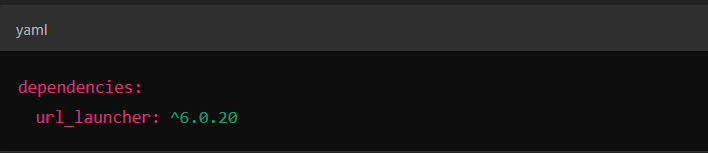
Then run flutter pub get to install the package.
Update platform-specific configurations:
- For Android:
Ensure that yourAndroidManifest.xmlfile includes the following permissions:

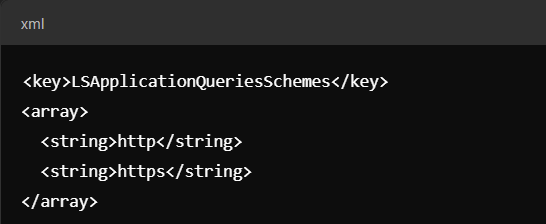
For iOS:
Add the required URL schemes to your Info.plist:
Basic Usage
Here’s a simple example of how to launch a URL in your app:
url_launcher-example/url at main · Suneel-DK/url_launcher-example
Advanced Features
The url_launcher package supports more than just web links. Below are some advanced use cases:
Dialing a phone number
Sending an email
Opening a map location
Customized launch options
Error Handling and Best Practices
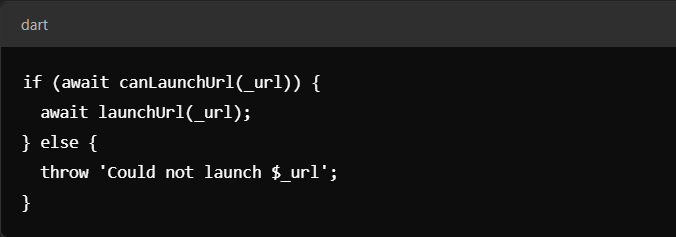
- Check if a URL can be launched:
Always usecanLaunchUrlto ensure the URL is valid and can be opened:
Handle platform differences:
Some schemes may behave differently on Android and iOS. Always test thoroughly.User Experience:
If your app uses in-app web views, consider adding navigation controls for a smoother user experience.
Common Issues and Troubleshooting
“Could not launch URL” Error:
Ensure the URL is properly formatted and valid.Platform-specific limitations:
For example,geo:URLs may not work without a mapping app installed.Missing permissions:
Double-check yourAndroidManifest.xmlandInfo.plistconfigurations.
Conclusion
The url_launcher package is a powerful tool in the Flutter ecosystem. Whether you're building a social media app, a business directory, or a navigation tool, url_launcher enables seamless interaction with external apps.
Implementing url_launcher responsibly can enhance your app's interactivity and provide a more dynamic user experience.
🚀 Start exploring and integrating url_launcher in your projects today!
Additional Resources
Official Documentation: pub.dev/url_launcher
Tutorial Video: [https://youtu.be/zzKlooWofSc?feature=shared]
Comments
Join the discussionNo comments yet. Be the first to comment.